
Accounting is one of the most important functions of any business. Whether you run a small shop, a growing startup, a professional service firm, or an established company, accurate financial records are essential for managing cash flow, controlling expenses, preparing tax returns, and making informed business decisions.
For many years, businesses relied heavily on traditional accounting methods involving physical bills, registers, spreadsheets, files, and manual calculations. Today, digital accounting has transformed how businesses record, manage, analyze, and report their financial information.
But what exactly is the difference between digital accounting and traditional accounting? Which approach is more efficient? And should your business switch to digital accounting?
Let's compare both approaches in detail.
What Is Traditional Accounting?
Traditional accounting refers to accounting processes that depend largely on manual record-keeping and physical documentation.
A business using traditional accounting may maintain:
-
Physical sales and purchase records
-
Cash books
-
Printed invoices and bills
-
Manual expense registers
-
Physical ledgers
-
Paper receipts
-
Spreadsheet-based calculations
-
Manually prepared financial statements
-
Physical accounting files
An accountant or business owner records transactions, calculates totals, reconciles accounts, and prepares reports manually or with limited software assistance.
Traditional accounting can work for very small businesses with a limited number of transactions. However, as transaction volumes increase, manual processes can become time-consuming and difficult to manage.
What Is Digital Accounting?
Digital accounting uses accounting software, cloud platforms, automation, electronic invoices, digital documents, and connected financial systems to manage accounting activities.
Instead of maintaining everything in physical files, businesses can digitally record and organize:
-
Sales invoices
-
Purchase invoices
-
Expenses
-
Payments and receipts
-
Bank transactions
-
Tax information
-
Customer and supplier balances
-
Payroll information
-
Financial reports
-
Business documents
Modern accounting systems can also automate repetitive tasks such as invoice generation, transaction categorization, bank reconciliation, tax calculations, and financial reporting.
This allows business owners and accountants to spend less time on repetitive data entry and more time analyzing financial information.
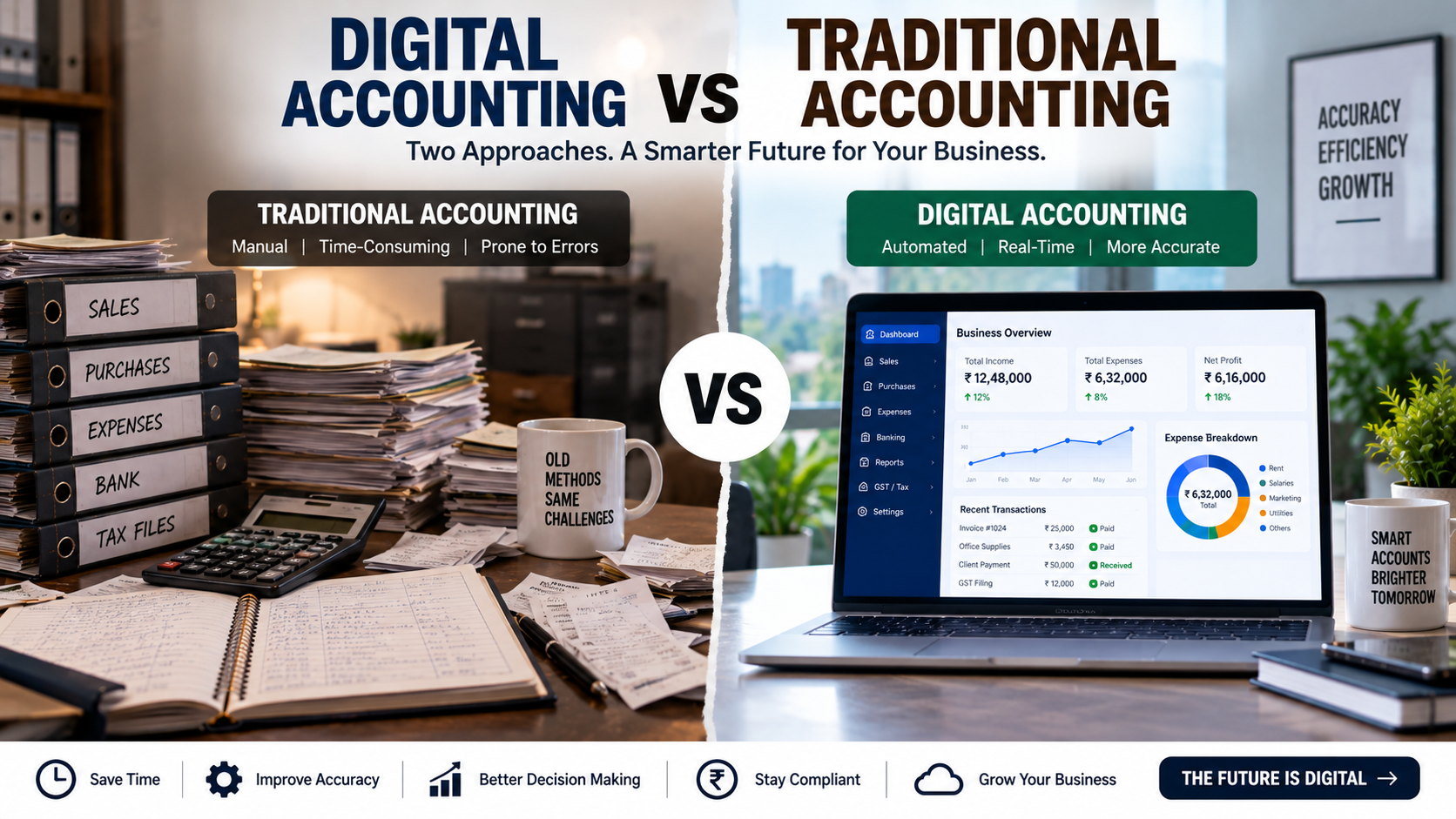
Digital Accounting vs Traditional Accounting: Key Differences
The biggest difference is the way financial information is recorded, processed, stored, and accessed.
| Factor | Traditional Accounting | Digital Accounting |
|---|---|---|
| Record keeping | Paper/manual | Digital |
| Data entry | Mostly manual | Manual + automated |
| Document storage | Physical files | Digital/cloud storage |
| Accessibility | Usually location-dependent | Can be accessed remotely, depending on system |
| Calculations | Manual/spreadsheets | Automated |
| Reporting | Often manual | Faster and automated |
| Data search | Requires checking files | Searchable digitally |
| Collaboration | More difficult | Easier with shared systems |
| Backup | Physical copies | Digital/cloud backups, depending on setup |
| Integration | Limited | Can integrate with banking, invoicing and other systems |
| Scalability | Can become difficult as volume grows | Generally easier to scale |
1. Data Entry and Transaction Recording
Traditional accounting often requires accountants or employees to manually enter transactions into registers or spreadsheets.
For example, if a business receives 100 invoices in a month, the accountant may need to manually record each invoice, verify the amount, classify the expense, and update the relevant ledger.
Digital accounting can reduce this workload through features such as:
-
Automated invoice creation
-
Recurring invoices
-
Bank transaction imports
-
Automated transaction categorization
-
Digital receipts
-
Payment integrations
-
Optical character recognition (OCR), where supported
Automation doesn't eliminate the need for accounting expertise, but it can reduce repetitive administrative work.
2. Accuracy
Manual accounting creates opportunities for human errors.
Common examples include:
-
Incorrect data entry
-
Duplicate entries
-
Calculation mistakes
-
Incorrect account classification
-
Missing transactions
-
Transcription errors
Digital accounting software can automatically perform many calculations and apply predefined rules.
However, software does not guarantee accurate accounts. Incorrect configuration, incorrect source data, duplicate transactions, or poor accounting practices can still produce incorrect financial records.
Therefore, digital accounting improves efficiency, but proper accounting controls and professional review remain important.
3. Speed of Accounting
Traditional accounting can become slow when transaction volumes increase.
Consider a growing business that has:
-
Hundreds of sales invoices
-
Multiple suppliers
-
Several bank accounts
-
Regular employee expenses
-
Online payments
-
Multiple tax obligations
Managing all of this manually can consume considerable time.
Digital accounting can process large numbers of transactions more efficiently and generate reports much faster.
For example, instead of manually calculating monthly sales, expenses, receivables, and payables, a digital accounting system may generate these reports with a few selections.
4. Access to Financial Information
One of the major advantages of digital accounting is easier access to financial information.
With an appropriate cloud-based accounting system, authorized users may be able to access financial information from different locations and devices.
This can be useful for:
-
Business owners
-
Accountants
-
Finance managers
-
Management teams
-
Tax professionals
-
Authorized employees
Traditional accounting usually requires access to physical files or a particular computer where the records are maintained.
For businesses with remote teams or multiple locations, digital accounting can make collaboration significantly easier.
5. Document Management
Traditional accounting often involves storing invoices, receipts, vouchers, bank statements, and other documents in physical folders.
Over time, this can create problems:
-
Files take up physical space
-
Documents can be misplaced
-
Searching takes time
-
Paper can deteriorate
-
Multiple copies may be required
Digital accounting allows businesses to organize documents electronically.
Documents can often be:
-
Uploaded
-
Categorized
-
Searched
-
Attached to transactions
-
Shared with authorized users
-
Backed up digitally
Businesses should still maintain documents and records according to the applicable legal and tax requirements.
6. Financial Reporting
Financial reports are essential for understanding business performance.
Traditional accounting may require significant manual work to prepare:
-
Profit and loss statements
-
Balance sheets
-
Cash flow reports
-
Sales reports
-
Expense reports
-
Accounts receivable reports
-
Accounts payable reports
Digital accounting software can generate many of these reports automatically from recorded transactions.
This gives business owners quicker access to financial information and can support better management decisions.
For example, a business owner can regularly review:
Revenue → Expenses → Gross Profit → Net Profit → Receivables → Cash Position
Instead of waiting until the end of the financial year, management can use regular financial reports to monitor business performance.
7. Tax and Compliance Management
Accounting and taxation are closely connected.
Businesses may need to manage obligations related to:
-
GST
-
Income tax
-
TDS
-
Payroll
-
Financial statements
-
Annual filings
-
Audit requirements
-
Other applicable statutory compliance
Digital accounting systems can help organize the financial data required for compliance and reporting.
Some systems can also integrate tax-related workflows or generate reports required for tax preparation.
However, businesses should not assume that accounting software automatically makes them compliant. Tax laws and filing requirements can change, and professional review may still be necessary.
8. Cost of Accounting
At first glance, traditional accounting may appear cheaper because it requires fewer software subscriptions.
However, businesses should consider the total cost of accounting.
Traditional accounting can involve:
-
Paper and printing
-
Physical storage
-
Manual data entry
-
Additional administrative time
-
Reconciliation work
-
Repeated calculations
-
Higher labor requirements as transaction volume grows
Digital accounting may involve:
-
Accounting software subscriptions
-
Cloud storage
-
Implementation costs
-
Training
-
Professional accounting services
-
Integration costs
The right comparison is therefore not simply software cost vs paper cost.
Instead, businesses should evaluate the total cost of maintaining accurate financial records.
9. Data Security
Traditional accounting relies heavily on physical documents.
Physical records can be exposed to risks such as:
-
Fire
-
Water damage
-
Theft
-
Misplacement
-
Unauthorized access
-
Physical deterioration
Digital accounting introduces different risks, including:
-
Unauthorized account access
-
Weak passwords
-
Phishing
-
Malware
-
Data loss
-
Incorrect user permissions
A properly managed digital accounting environment should therefore use appropriate security controls such as strong passwords, access permissions, backups, software updates, and multi-factor authentication where available.
Digital does not automatically mean secure. Security depends heavily on how the system is configured and managed.
10. Automation
Automation is one of the biggest differences between digital and traditional accounting.
Depending on the software, businesses may automate processes such as:
Invoicing
Automatically create and send recurring invoices.
Expense Tracking
Record and categorize business expenses.
Bank Reconciliation
Match accounting transactions with bank transactions.
Payment Reminders
Send reminders for overdue invoices.
Financial Reports
Generate reports based on recorded transactions.
Recurring Transactions
Automatically record regular payments or invoices.
These features can reduce repetitive work and allow accounting teams to focus on higher-value activities.
11. Business Decision-Making
Accounting is not only about recording historical transactions.
Good financial information helps management answer questions such as:
-
Which products generate the highest margins?
-
Which customers owe us money?
-
How much cash is available?
-
What are our biggest expenses?
-
Is the business profitable?
-
Can we afford to hire additional employees?
-
Can we expand to another location?
-
How much working capital do we need?
Digital accounting can make this information available faster through dashboards and real-time or near-real-time reporting, depending on the system and data quality.
This can make accounting more useful as a management tool rather than simply a compliance function.
Can Small Businesses Benefit From Digital Accounting?
Yes.
Digital accounting is not only for large companies.
Small businesses can benefit from digital systems when they have:
-
Increasing transaction volumes
-
Multiple suppliers
-
Growing sales
-
GST or other tax obligations
-
Employees
-
Multiple payment channels
-
Online sales
-
Regular customer receivables
-
Multiple business locations
Even a small business can benefit from moving away from scattered spreadsheets and physical files toward a structured accounting system.
However, the software should match the size and complexity of the business. A very small business may not need an expensive enterprise accounting platform.
Is Traditional Accounting Completely Outdated?
Not necessarily.
Traditional accounting methods can still exist alongside digital systems.
For example, a business may still need to:
-
Keep original documents where required
-
Maintain supporting records
-
Review physical agreements
-
Preserve certain statutory documents
-
Use manual approval processes
The important point is that accounting itself has not disappeared. The technology used to perform and manage accounting has changed.
Many modern businesses actually use a hybrid accounting approach, combining digital accounting software with professional review and required physical documentation.
Digital Accounting vs Traditional Accounting: Which Should Your Business Choose?
There is no single solution for every business.
A small business with very few transactions may be able to operate with a simple accounting system and limited automation.
A growing company with hundreds or thousands of monthly transactions may benefit considerably from digital accounting.
Consider digital accounting if your business is experiencing:
-
Rapid transaction growth
-
Increasing bookkeeping workload
-
Difficulty tracking receivables
-
Frequent reconciliation issues
-
Too many spreadsheets
-
Difficulty finding documents
-
Delayed financial reports
-
Multiple employees handling financial data
-
Multiple locations or remote teams
The decision should be based on your business size, transaction volume, accounting requirements, budget, compliance obligations, and future growth plans.
How to Move From Traditional to Digital Accounting
If your business currently relies on paper files or spreadsheets, you do not have to change everything overnight.
Follow a structured transition process.
Step 1: Review Your Existing Accounting System
Identify how you currently manage:
-
Sales
-
Purchases
-
Expenses
-
Bank transactions
-
Payroll
-
Tax records
-
Customer balances
-
Supplier balances
Step 2: Choose Appropriate Accounting Software
Compare software based on:
-
Features
-
Ease of use
-
Scalability
-
Security
-
Integrations
-
Reporting
-
Pricing
-
Support
-
Tax requirements
Step 3: Organize Your Financial Data
Clean up duplicate, incomplete, or outdated records before migrating them.
Step 4: Create User Access Controls
Give employees access only to the information and functions they actually need.
Step 5: Digitize Relevant Documents
Organize invoices, receipts, statements, contracts, and other supporting records electronically where appropriate.
Step 6: Train Your Team
Employees should understand:
-
How to record transactions
-
How to upload documents
-
How to classify expenses
-
How to approve transactions
-
How to generate reports
-
How to protect account credentials
Step 7: Reconcile and Review
After implementation, regularly compare accounting records with bank statements, invoices, payment records, and other source documents.
Common Mistakes When Moving to Digital Accounting
Businesses sometimes make the mistake of assuming that purchasing accounting software solves every accounting problem.
Avoid these mistakes:
1. Choosing Software Without Understanding Your Requirements
More expensive software is not automatically better.
2. Entering Poor-Quality Data
Incorrect information will produce incorrect reports regardless of how advanced the software is.
3. Ignoring User Permissions
Not every employee needs full accounting access.
4. Failing to Reconcile Accounts
Digital systems still require regular reconciliation and review.
5. Not Taking Backups
Businesses should have appropriate backup and recovery procedures.
6. Ignoring Compliance Requirements
Accounting software should support compliance, but businesses remain responsible for meeting applicable legal and tax obligations.
7. Using Too Many Unconnected Tools
A collection of disconnected spreadsheets, apps, and accounting systems can create duplicate work and inconsistent data.
Digital Accounting Is More Than Going Paperless
One common misconception is that digital accounting simply means replacing paper with software.
It is much broader than that.
A well-designed digital accounting system can connect:
Sales → Invoicing → Payments → Banking → Expenses → Reconciliation → Reporting → Tax & Compliance
This creates a more organized financial information system for the business.
The real benefit is not simply reducing paper. It is improving the speed, visibility, consistency, and usability of financial information.
Final Thoughts
The debate between digital accounting vs traditional accounting is ultimately about how a business wants to manage its financial information.
Traditional accounting can still work for simple businesses with limited transactions. But as businesses grow, manual processes can become increasingly difficult to maintain.
Digital accounting offers automation, faster reporting, easier document management, improved accessibility, and better integration with modern business operations.
The best approach is to choose an accounting system that matches your business requirements rather than adopting technology simply because it is modern.
For many growing businesses, the combination of digital accounting software + professional accounting oversight + regular financial review can create a more efficient and reliable accounting process.
If your business is still managing most accounting activities manually, this may be a good time to evaluate where digital accounting can save time, improve financial visibility, and support future growth.
Need help setting up or managing your business accounting? Professional accounting and compliance support can help you choose the right system, maintain accurate records, and stay organized throughout the financial year.
Frequently Asked Questions
1. What is the main difference between digital accounting and traditional accounting?
Traditional accounting relies more heavily on manual processes and physical records, while digital accounting uses accounting software, electronic records, automation, and digital workflows.
2. Is digital accounting suitable for small businesses?
Yes. Small businesses can use digital accounting to manage invoices, expenses, banking, financial reports, and other accounting activities more efficiently.
3. Is digital accounting more accurate than traditional accounting?
Digital systems can reduce certain manual calculation and data-entry errors, but accuracy still depends on correct data, proper configuration, reconciliation, and professional review.
4. Can digital accounting reduce accounting costs?
It can reduce repetitive administrative work and improve efficiency, but the overall financial impact depends on software costs, transaction volume, staffing, and how the system is implemented.
5. Is traditional accounting still useful?
Yes. Businesses may still need physical documents and manual controls for certain processes. Many businesses use a combination of digital systems and traditional documentation.
6. Should I switch my business from traditional to digital accounting?
The decision depends on your transaction volume, business complexity, compliance requirements, budget, and growth plans. A professional assessment can help determine the appropriate approach.
Disclaimer: This article is intended for general educational and informational purposes. Accounting, tax, and compliance requirements can vary depending on the business, jurisdiction, and applicable laws. Consult a qualified accounting or tax professional for advice specific to your business.
Published on September 19, 2026